How to Find Trending Audio on Instagram: What Actually Works
 Aiden Parker··11 min read
Find trending audio on Instagram by checking Reels audio pages, searching recent posts, and saving sounds before you create. A rising-arrow label can help, but it isn’t proof that a sound will fit your audience or still be popular when you post.
Your result changes with account type, region, posting time, and how quickly you act. The strongest method combines Instagram’s own audio signals with recent use, a clear match for your video, and a check that you can legally use the sound.
Who needs trending audio help?
A new creator may understand Reel creation but not where Instagram shows popular sounds. That reader needs a quick way to find audio without scrolling for an hour or copying a sound that’s already overused.
A business or professional account may see fewer songs because music access can depend on account type, location, and licensing. For promotional content, use original audio you own, royalty-free music licensed for the intended use, or music with explicit commercial permission.
A creator who already watches Reels usually needs better judgment, not more search ideas. That person needs to compare recent use, audience fit, and the time needed to make the post.
This page serves creators who can access Reels and want to choose audio for a new post. It assumes you can update Instagram, open a Reel, and publish or save a draft. If your account has restricted music access, use Instagram’s available library instead of trying to bypass the restriction.
What makes audio trend?
Recent momentum matters most. A sound used in new Reels today is more useful than one with a huge total count from months ago. Open several recent posts from the audio page and compare their posting dates. If nearly all examples are old, the sound may be fading.
The audio must fit the video. A soft visual, a product demonstration, and a fast joke need different timing and energy. If the beat, lyric, or spoken line conflicts with your message, a popular sound can reduce watch time rather than help it.
Your account’s access changes the result. Personal, creator, and business accounts may not see the same music. Region and licensing also matter. Search the same sound while logged into the account that will publish, because another account’s result isn’t a reliable guide.
The sound’s format affects reuse. Some audio comes from a song, while other sounds are a creator’s voice, a remix, or original recording. Check the audio page before planning around it. The title, creator name, and available “Use audio” option tell you what Instagram has made available.
Timing is easy to misread. A sound can rise quickly and become crowded just as quickly. The mistake people get wrong most often is choosing a sound because its total use count looks large, then posting after the strongest wave has passed.
How to find trending audio
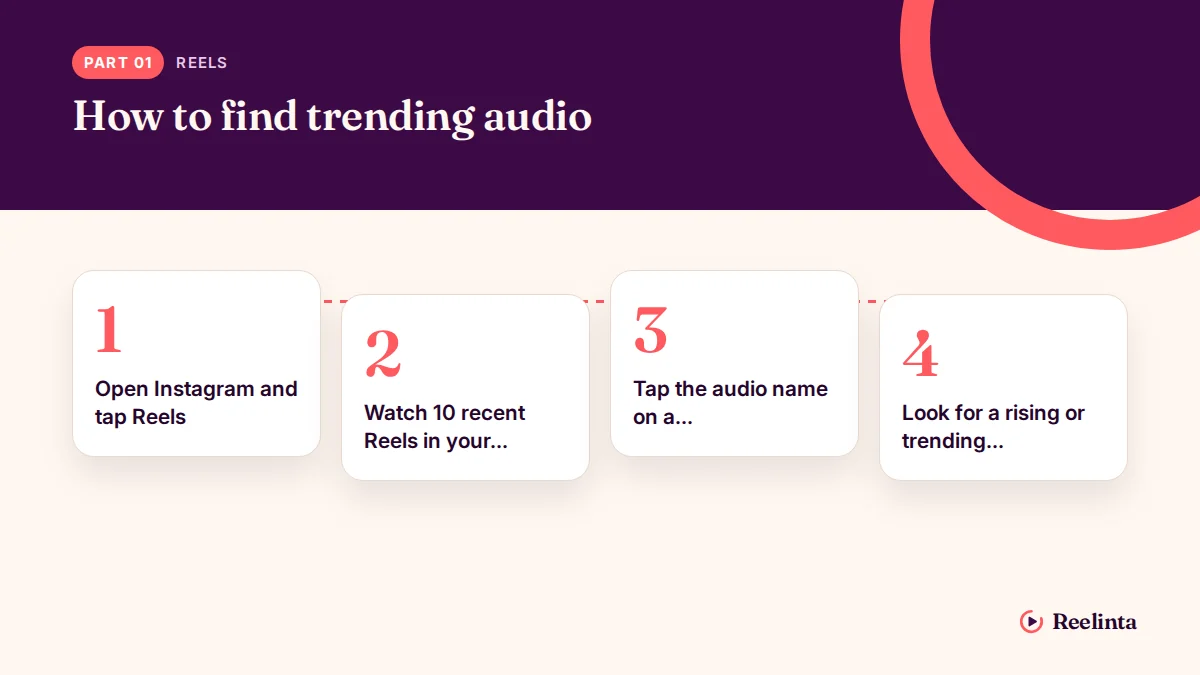
Instagram’s labels and menus can move, so use the audio page as your main checkpoint. Don’t rely on one icon alone; confirm the sound is recent, available to your account, and suitable for the clip.
-
Open Instagram and tap Reels. Use the account that will publish the video. The screen should show the current Reels feed, not an old saved post.
-
Watch 10 recent Reels in your niche. Look for repeated songs, spoken clips, or sound effects. Count a sound only when it appears in fresh posts, not when several older posts use it.
-
Tap the audio name on a promising Reel. Instagram should open that sound’s audio page. Check the title, creator, sample, and the number of Reels using it.
-
Look for a rising or trending signal. Instagram may show an upward arrow or a similar label, but the wording and placement can vary by account and app version. If no signal appears, continue with the recent-post check.
-
Play the useful section of the sound. Listen for the beat change, spoken cue, or lyric you want to match. Save the audio only if that section suits your planned cut.
-
Check at least five recent examples. Open posts from different creators and note how they use the same moment. The check worked when you can describe one clear visual action that matches the sound.
-
Tap Save audio or copy the audio link. Use Instagram’s save control when it appears. Confirm the sound is now in your saved audio area before leaving the page.
-
Make a short draft with the sound. Add the video, then align the main movement or text change with the audio cue. Preview it with sound on and captions visible.
-
Review account access before posting. If “Use audio” is missing or Instagram shows a restriction, choose another sound available on that account. Don’t download and re-upload copyrighted music as a workaround.
The key judgment is whether the sound improves the video’s first clear action. If the viewer needs to wait for the audio before understanding the post, choose a cleaner sound or lead with the visual instead.
Audio choices at a glance
Different situations need different checks, so the fastest sound isn’t always the best sound.
| Situation | What to do | What it takes | What to watch for |
|---|---|---|---|
| Rising-arrow sound | Check recent examples | Five-minute review | May become crowded |
| High-use sound | Compare posting dates | Extra scrolling time | Old momentum misleads |
| Business account | Use available library | More searching effort | Music access varies |
| Original creator audio | Open audio page | Credit check | Creator may remove it |
| Spoken meme sound | Match exact cue | Careful editing | Context may change |
| Local audience | Check local Reels | Region-specific search | Trends differ by country |
Details that improve results
Prepare before you search
Write the video’s main action in one sentence before opening audio search. For example, “the package opens on the beat” gives you a timing target, while “find a viral sound” gives you no useful filter.
Keep two or three candidate sounds, not one. Compare their recent examples, usable section, and account access. If one disappears or becomes restricted, you won’t need to restart the search.
Experienced creators also check the audio at normal phone volume. A sound that works only with headphones may hide speech, a product detail, or important on-screen text.
Leave some things alone
Don’t force every cut onto every beat. One strong transition often looks cleaner than six small edits that make the video hard to follow.
Don’t change the original audio name, creator credit, or available sound settings. Use Instagram’s own audio controls when possible, and leave the sound alone if the page shows no usable option for your account.
The best sign during editing is simple: the visual still makes sense with the sound muted. Audio should strengthen the idea, not carry the whole explanation.
Common audio problems and fixes
A failed audio choice usually shows up before publishing. Match the visible problem to the first safe check instead of deleting the whole draft.
| What you notice | What it usually means | What to do first | How to stop it happening again |
|---|---|---|---|
| Audio page won’t open | App or connection issue | Update and reopen Instagram | Keep app updated |
| Use audio button missing | Account access differs | Try available audio | Check account library first |
| Sound is muted | Rights or availability changed | Replace the sound | Keep a backup candidate |
| Trend feels overused | Momentum already peaked | Check recent post dates | Favor newer examples |
| Beat doesn’t match cuts | Sound lacks visual fit | Re-edit one key moment | Draft before publishing |
| Music covers speech | Audio mix is unbalanced | Lower music volume | Check captions and playback |
| Saved audio disappeared | Sound was removed | Search the creator again | Save two alternatives |
Music rules on Instagram
Instagram access isn’t the same as permission to use any song in any context. Meta’s Music Guidelines explain that music use can be limited, muted, blocked, or changed when rights or product rules don’t allow it.
Rules can differ by country, account type, and the intended use of the post. Check the notice shown inside your publishing screen and the current Meta rules for your account’s region.
If a Reel promotes a business, product, or service, don’t assume a popular song is cleared for that use. Use audio Instagram makes available for that account, original audio you own, or music with a license that covers the planned use.
Stop at the point where Instagram shows a rights warning or you can’t identify permission. A qualified music-licensing professional or your organization’s legal adviser should handle questions about commercial rights.
The real cost of finding audio
The main cost is time. A quick search may take only a few minutes, but checking recent examples, matching the edit, and replacing restricted audio can take much longer than the first tap suggests.
The biggest hidden cost is rework. Choosing a sound before filming can force you to change cuts, captions, or the opening. Choosing the video idea first gives you less trend speed but usually makes the post easier to understand.
There’s also a reach trade-off. A popular sound may help your Reel fit a current format, but it also puts your video beside many similar posts. Original audio can offer more control, while a trending sound may give you a faster starting point.
Compare the time needed to make two drafts, not just the audio’s popularity. If the sound saves editing time and improves the first visual action, it may be worth using; if it creates extra work without a clear match, skip it.
Keep your audio choices organized
Save promising sounds as soon as you find them, then add a short note outside Instagram with the sound name, the video idea, and the date you found it. This helps you remember why the sound looked useful.
Check saved audio before starting a new Reel. A sound may no longer be available, or its recent examples may no longer match your audience. If the sound page opens but the use option is gone, replace it rather than rebuilding the post around it.
Keep one backup sound with a similar beat or mood. If the first sound becomes muted, restricted, or too crowded, you can test the backup without starting the concept again.
The useful value varies by sound: its recent use, account access, and fit for your video can change from day to day. Read your own position from the audio page, the newest examples, and the controls Instagram shows before publishing.
When trending audio isn’t the right choice
Trending audio isn’t the right choice when your video explains a complex product, instruction, or safety point. Use clear voice-over and captions first, then add quiet background audio only if it doesn’t hide the message.
Skip a trend when your account can’t use it legally or Instagram shows a rights warning. Choose original audio, Instagram-approved music for your account, or a properly licensed track instead.
It also isn’t right when the sound forces a weak idea. A strong video with simple audio is better than a confusing video built around a popular clip. If you need help with commercial music rights, stop and ask a licensing professional or legal adviser.
Frequently asked questions
Can I find trending audio without scrolling Reels?
Yes, you can search audio by name or open the audio page from a Reel. Search helps when you already know part of the sound, while Reels browsing helps you notice new sounds before you know their names.
Why can’t I see the same trending sounds?
Your account type, country, licensing access, and app version can change the results. A business account may have fewer music choices than another account. Search from the publishing account and follow the options Instagram shows there.
How long does trending audio stay popular?
There isn’t a fixed number of days. Check the dates on at least five recent examples instead. If new posts are still appearing and the sound fits your niche, it may still be useful; if examples are old, choose a newer option.
Is it safe to use any audio marked trending?
No. A trending label shows popularity or current use, not full permission for every post. Check whether Instagram lets your account use the sound, and be more cautious when the Reel promotes a business, product, or service.
What happens if Instagram removes my audio?
Instagram may mute the Reel or remove the sound while leaving the video available. Open the Reel’s notice and follow the replacement option if shown. If the post depends on speech or timing, edit the draft with a backup sound.
Does the number of Reels using audio matter?
Yes, but only with recent dates and audience fit. A large total count can reflect old use, while a smaller sound with fresh posts may be gaining attention. Compare the newest examples before deciding.
Can I use trending audio on a business account?
Sometimes. Music access can differ for business accounts, regions, and particular tracks. Search while logged into the business account, and use only the audio and publishing options Instagram makes available there.
What to do with trending Instagram audio first
Start by opening five recent Reels in your niche and checking each promising audio page for access, freshness, and a clear visual cue. Expect a useful candidate to make your edit easier to understand. Stop and get help when Instagram shows a rights warning you can’t resolve.
Aiden Parker writes about Instagram strategy, features, and growth, covering everything from captions and hashtags to algorithms, analytics, and audience engagement. His content explores Reels, Stories, Highlights, profile optimization, and Instagram for Business, offering practical insights to help creators and businesses improve their content, reach the right audience, and build a stronger presence on the platform.