How Long Should Instagram Reels Be? The Answer
 Aiden Parker··10 min read
For most Instagram Reels, aim for 15–30 seconds. Use up to 60 seconds when the story needs more space, and up to 3 minutes only for useful, longer content. In practice, make Instagram Reels only as long as needed.
Your best length depends on the idea, the first-second hook, and how quickly viewers get value. A short tutorial needs enough time to show the result, while a simple reaction may work in 7–15 seconds.
Which Instagram Reels Need a Different Answer?
A new creator usually needs a simple starting point: short videos with one clear idea. The main goal is to learn where viewers stop watching, not to fill the full 3-minute limit.
A business account may need more time for a product demonstration, customer question, or step-by-step explanation. It should still remove pauses, repeated points, and slow introductions.
An experienced creator often studies retention data and adjusts each Reel by topic. That creator needs a testing method, not one fixed length.
This page serves creators who want a practical length for normal Instagram Reels and can check basic insights in Instagram. It assumes you’re making standard short-form videos, not paid ads with separate campaign goals. If you need advanced audience testing, read Instagram’s current creator guidance and use your account’s professional insights.
What Decides Reel Length?
The idea’s size matters most. One joke, reaction, or visual reveal can finish in 7–15 seconds. A recipe, comparison, or tutorial may need 30–90 seconds. Write the ending first; if the idea has only one useful point, don’t stretch it.
The opening controls the usable length. Put the result, question, or visual change in the first 1–2 seconds. If the viewer must wait for context, shorten the setup or show the outcome before explaining it.
The audience’s viewing habit changes the target. Check the retention graph for similar Reels. If viewers leave before the main point, shorten the introduction; if they stay but replay a section, make that section clearer.
The format sets a natural limit. A fast visual joke often feels slow at 30 seconds. A three-step lesson can feel rushed at 15 seconds. Match the duration to the number of actions, not to a popular creator’s video.
The ending affects the final seconds. Finish after the payoff, answer, or next action. The mistake people get wrong most often is adding a long call to action after the useful part; that extra time can lose viewers before the Reel ends.
How To Choose Reel Length
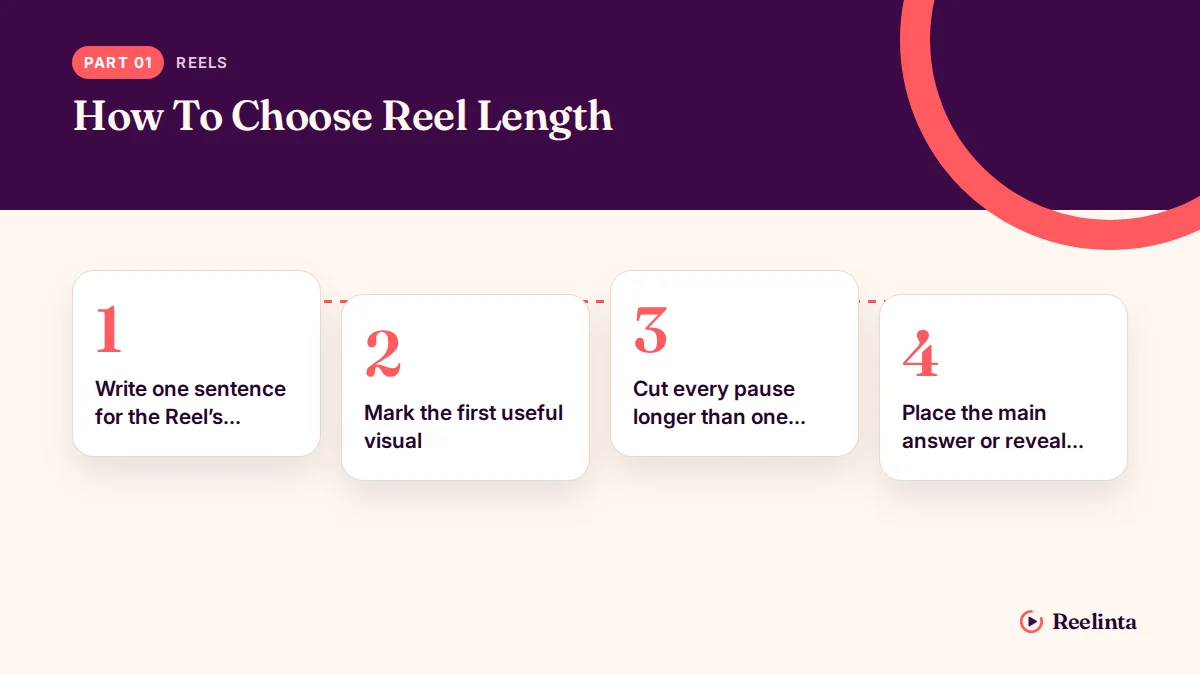
Use these steps for a standard vertical Reel. They assume you’re editing on a phone or computer and already have the footage; recording time isn’t included.
- Write one sentence for the Reel’s promise. If you can’t state the result clearly, split the idea before editing.
- Mark the first useful visual. Put it at 0–2 seconds, and check that it appears before a long greeting or logo.
- Cut every pause longer than one second. Play the edit once with sound and once muted; the point should still be easy to follow.
- Place the main answer or reveal next. For a simple idea, put it within 15 seconds; the viewer should understand the promise before this point.
- Add only necessary proof. Keep one example, demonstration, or supporting detail, and remove repeated evidence.
- Record the call to action in one sentence. Ask for one action, such as saving or commenting, and stop when the sentence ends.
- Watch the full Reel without editing. If any part feels slow, trim it rather than adding music or text to hide the problem.
- Choose the shortest complete version. Use 15–30 seconds for one clear idea; choose longer footage only when removing it would remove the answer.
- Publish and check Insights. Compare watch time and retention with Reels about the same topic, not with unrelated posts.
The key judgment is whether the viewer gets the promised value before leaving. A 12-second Reel that finishes cleanly is better than a 45-second Reel padded with pauses.
Reel Lengths At A Glance
Choose the row that matches the job your Reel must complete, not the length you usually prefer.
| Situation | What to do | What it takes | What to watch for |
|---|---|---|---|
| Quick joke or reaction | Aim for 7–15 seconds | Fast setup and payoff | Delayed punchline |
| One visual tip | Aim for 10–20 seconds | One clear action | Extra explanation |
| Simple product feature | Aim for 15–30 seconds | Show feature and result | Hidden product value |
| Three-step tutorial | Aim for 30–60 seconds | Three visible steps | Rushed instructions |
| Story or case example | Aim for 45–90 seconds | Strong beginning and ending | Slow middle |
| Detailed explanation | Use up to 3 minutes | Tight editing throughout | Repeated points |
Details That Improve Reel Quality
Prepare The First Seconds
Experienced editing starts with the first frame, not the caption. Show the finished result, the problem, or the strongest movement immediately. Then add context only when it helps the viewer understand what they’re seeing.
Keep text large enough to read on a phone and leave it on screen long enough to finish. Read each text card aloud; if the card takes longer than the visual moment, shorten the words or extend that shot.
Edit What Viewers Need
Good Reels keep the order easy to follow: promise, proof, payoff, then one action. They don’t add a second topic just because empty seconds remain.
Check the video at normal speed, not only while scrubbing. If you can remove a clip without losing the promise or proof, remove it. Music, captions, and transitions can support the idea, but they can’t repair a slow structure.
Common Reel Length Problems
A Reel’s visible problem often points to an editing choice rather than a missing effect. Check the first change below before changing hashtags or audio.
| What you notice | What it usually means | What to do first | How to stop it happening again |
|---|---|---|---|
| Viewers leave immediately | Weak opening frame | Show the result first | Write the hook before filming |
| Video feels rushed | Too many actions | Remove one action | Plan one promise per Reel |
| Ending feels abrupt | Missing payoff | Add the final result | Outline the ending first |
| Watch time drops late | Repeated explanation | Cut the repeat | Use one proof point |
| Viewers miss text | Text changes quickly | Extend text display | Use shorter text cards |
| Reel loops awkwardly | Ending doesn’t connect | Trim final pause | Check the loop before posting |
Instagram Rules To Check
Instagram allows Reels up to 3 minutes, following Instagram’s January 2025 announcement. You can read the Instagram three-minute Reels update for the platform’s published change.
That’s a maximum, not a requirement. Features and limits can differ by account, region, app version, or content type. Check the upload screen before editing a long video, and check Instagram’s Help Center if your account shows a different maximum.
If the app rejects the file or shows a shorter limit, use the limit shown for your account rather than uploading the same file repeatedly. Use three minutes only when the added material earns its place; otherwise, cut pauses, repeated points, or a slow opening.
Copyright rules still apply to video, music, and other material. If you don’t own the content or have permission, stop and check Instagram’s current rights guidance before publishing; repeated violations can affect account access. Music availability can vary by account, region, and commercial use. For promotional posts, use audio you created or properly licensed, and keep proof of that permission.
The Real Cost Of Longer Reels

Longer Reels cost more attention, editing time, and viewer patience. A 15-second video may need one strong shot, while a 60-second tutorial needs a clear script, several usable clips, captions, and a clean ending.
The cost rises when you explain the same idea in several ways. It also rises when the subject needs proof, safety context, or multiple steps. Compare the time needed to make the Reel with its expected value to the viewer.
There’s no universal length that guarantees reach. Your own retention graph is the useful measure: compare similar topics, openings, and formats. If a shorter version keeps the same message and holds attention longer, use the shorter version.
Keeping Reel Performance On Track
Review each Reel’s Insights after it has had enough time to collect normal viewing data. Compare watch time, average percentage watched, shares, saves, and follows with posts about the same subject, not just with your account’s overall average. Check whether viewers reached the main point before judging the result.
A drop in the first seconds means the opening needs work. A drop near the ending means the Reel may be too long or the payoff arrives too late. If viewers watch but don’t share or save, make the value clearer or easier to act on. Keep a simple note of topic, length, opening style, key drop-off point, and result.
Don’t delete a Reel only because its first numbers look weak. If the content is accurate and useful, keep the lesson for the next edit. Start over only when the footage, information, or rights are wrong. If a claim is outdated or permission is uncertain, correct it before optimizing performance.
When Short Reels Aren’t Right
Short Reels aren’t the best choice for a process that needs several safe steps. Use a longer Reel, a carousel, or a linked full explanation when removing detail would make the instructions incomplete. If viewers must pause, measure, compare, or complete steps in order, put full instructions somewhere they can read at their own pace. A viewer shouldn’t have to infer a missing step from a fast visual.
They’re also wrong for a story that depends on context. Build the story with a clear beginning, change, and ending. Cutting it into a confusing 10-second clip can leave viewers unsure what changed or why it matters. If the point only makes sense after a cause, response, or consequence, give each part enough room to land.
This method isn’t for paid campaigns with strict advertising goals, regulated claims, or professional production requirements. Follow the relevant ad, legal, or industry guidance. Ask a qualified professional when the Reel could create health, financial, or legal risk. If a claim needs a disclaimer, qualification, or evidence, don’t assume a caption will make a rushed clip compliant.
Related guides
- How to Make Instagram Reels: A Step-by-Step Guide
- Best Time to Post Reels on Instagram: Hour-by-Hour Guide
- Instagram Reels Algorithm: How It Works and Ranks Videos
Frequently asked questions
Can a Reel be 3 minutes long?
Yes, Instagram Reels can be up to 3 minutes long under Instagram’s published update. That doesn’t mean every Reel should use the full limit. Use the extra time only when the topic needs several clear steps, examples, or a complete story.
Why are my short Reels not getting views?
Short length alone doesn’t create views. A weak first frame, unclear promise, poor audio, or late payoff can lose viewers quickly. Compare the opening and retention graph with similar Reels, then change one part at a time.
How long should a Reel be for a product?
A product Reel often works well at 15–30 seconds when it shows one feature and its result. Use more time only for a demonstration that needs several actions. If the feature is understood in 10 seconds, stop there.
Is it safe to make every Reel 7 seconds?
Yes, but 7 seconds is suitable only when the idea is instantly clear. A tutorial, warning, or product explanation may need more time. Cutting important details just to reach 7 seconds can make the Reel confusing or misleading.
What happens if my Reel is too long?
Viewers may leave before the payoff, especially when the opening is slow or the ending repeats earlier points. The practical fix is to remove pauses and repeated ideas. Don’t cut necessary instructions when the topic needs them.
Does Reel length matter for reach?
Yes, length can affect retention because viewers must watch enough of the video to reach its value. It doesn’t work alone, though. The topic, opening, editing, viewer interest, and sharing behavior also affect how far a Reel travels.
How often should I change my Reel length?
Change it when your retention data shows a repeated problem, not after one post. Test a shorter version for similar topics, then compare the results with your earlier format. Keep the topic and opening style as similar as possible.
Start With The Shortest Complete Reel
Make one clear promise in the opening: tell viewers what they will learn, see, or decide by the end. Keep every shot, caption, and line tied to it; cut greetings, repeated context, and anything that delays the point.
Edit the Reel to 15–30 seconds unless the idea genuinely needs more time to demonstrate a process or show a result. If the payoff needs background, provide only the minimum first, then deliver it promptly.
Before publishing, get qualified help from the relevant professional if the Reel could create legal, financial, or health risk. A disclaimer can’t repair misleading advice. If you can’t verify a claim, pause the Reel.
Aiden Parker writes about Instagram strategy, features, and growth, covering everything from captions and hashtags to algorithms, analytics, and audience engagement. His content explores Reels, Stories, Highlights, profile optimization, and Instagram for Business, offering practical insights to help creators and businesses improve their content, reach the right audience, and build a stronger presence on the platform.