How Many Reels to Post per Week? Here’s the Answer
 Aiden Parker··10 min read
Start with 3 Reels per week. Increase to 4–5 only when you can keep the same quality, topic, and posting schedule without rushing.
Your best number depends on your available time, video quality, audience response, and account goal. A new creator may need 2–3 weekly posts, while a full-time team may manage more. The useful target is the highest pace you can sustain for at least several weeks.
Who needs a Reels posting plan?
A new creator may have ideas but no repeatable filming process. This reader needs a simple weekly target and a way to judge whether each Reel is worth making.
A small business may already have products, customer questions, and sales goals. It needs a posting pace that supports visibility without taking time away from orders, service, or paid work.
A larger creator or marketing team may already post often. That reader needs a way to separate useful volume from rushed content, repeated ideas, and weak audience response.
This page serves the solo creator or small business best. It assumes you can make short videos with a phone, edit them safely, and check basic Instagram insights. If you need a full campaign calendar, paid advertising plan, or advanced production workflow, a social media strategist or marketing guide will suit you better.
What changes your weekly Reel count?
Your production time matters most. If one Reel takes 30 minutes from idea to caption, 3 per week may fit a small schedule. If each one takes 3 hours, start with 1–2 and improve the process before adding posts. Check your real time by tracking one complete Reel from planning to publishing.
Your content supply changes the safe pace. A business with regular product demonstrations can post more easily than an account that needs research for every video. Count your usable ideas for the next 2 weeks. If you have fewer than 6 strong ideas, don’t force a daily schedule.
Your audience response shows whether more posts are helping. Compare watch time, shares, saves, comments, profile visits, and follows across similar Reels. Don’t judge the plan from one post because topic, opening line, sound, and timing can all change the result.
Your goal also matters. For brand awareness, consistent reach and clear topics matter. For sales, fewer Reels with a strong product explanation may beat a larger number of general videos.
The factor people get wrong most often is quality at the opening. Posting 6 weak Reels won’t fix unclear subjects, slow introductions, or videos that give viewers no reason to continue.
How to Decide How Many Reels to Post Each Week
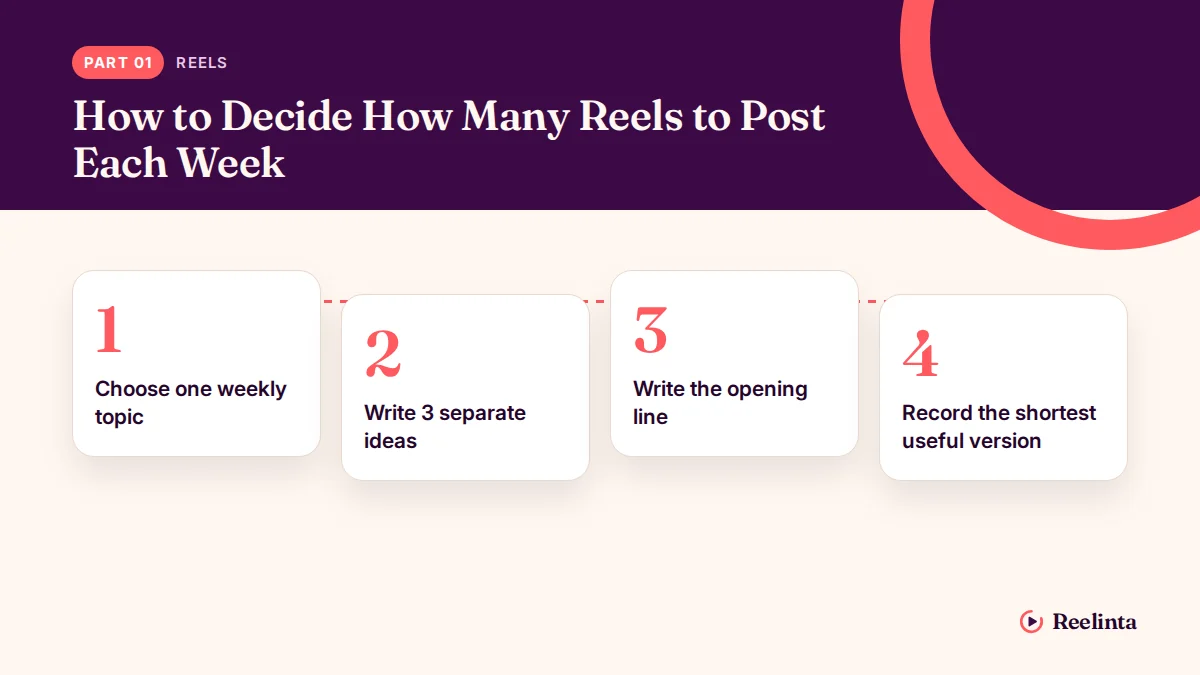
Use 3 weekly Reels as the starting plan below. It assumes one person has a phone, basic editing access, and about 2–4 hours available for the full week.
-
Choose one weekly topic. Write one sentence describing the problem your 3 Reels will address. The sentence is useful when each planned video answers a different part of that problem.
-
Write 3 separate ideas. Give each Reel one job: teach, demonstrate, or answer a question. Remove any idea that needs two unrelated messages.
-
Write the opening line. Put the main promise in the first sentence or visible text. It works when a viewer can tell the subject without reading the caption.
-
Record the shortest useful version. Film only the explanation, demonstration, or example needed for that idea. Stop when the answer is complete rather than adding a second topic.
-
Check the recording. Watch it once with sound and once without sound. Re-record if the speech is hard to hear, the opening is unclear, or important words disappear without audio.
-
Add accurate on-screen text. Keep the text close to the spoken point and correct every spelling mistake. It’s ready when the text doesn’t cover the product, face, or demonstration.
-
Publish on 3 chosen days. Leave at least one day between posts when your schedule allows. Use the same general posting windows for several weeks so you can compare results more fairly.
-
Record the results after each post. Note views, watch time, shares, saves, comments, profile visits, and follows in Instagram Insights. Compare similar topics rather than treating every Reel as equal.
If 3 Reels make you skip research, rush editing, or repeat the same idea, reduce the schedule to 2. A complete, clear Reel is more useful than a third post that only fills a calendar slot.
Reels schedules at a glance
The right schedule depends on the time and content you can protect each week.
| Situation | What to do in it | What it takes | What to watch for |
|---|---|---|---|
| New account | Post 2–3 weekly | Basic filming time | Clear topic |
| Busy solo creator | Post 2 weekly | Limited editing time | Missed deadlines |
| Small business | Post 3 weekly | Product preparation | Sales relevance |
| Strong idea library | Post 4 weekly | Repeatable workflow | Quality slipping |
| Full-time creator | Test 4–5 weekly | Dedicated production | Audience fatigue |
| Campaign period | Add temporary posts | Extra planning effort | Repeated messages |
What makes Reels work better?
Prepare before filming
A strong Reel usually starts with a specific viewer problem, not a blank camera screen. Write the problem, answer, and example before recording. If you can’t explain the Reel in one sentence, split the idea before filming.
Prepare any product, screen recording, tool, or example first. Film several clips for the same topic while the setup is ready, but don’t turn every clip into a separate post. Batch filming saves effort, yet publishing too many similar Reels can make your feed feel repetitive.
The opening should match the actual answer. Don’t promise a result that the video never explains. Check the first 2–3 seconds for clear speech, readable text, and a visible subject.
Check signals without chasing them
Look for patterns across at least several similar posts. A Reel with many views but few profile visits may attract attention without attracting the right audience. A Reel with fewer views but strong saves or inquiries may be more useful for a business.
Leave weak parts alone when the evidence doesn’t point to a problem. Don’t change your whole topic because one Reel performs poorly, and don’t copy a trend that doesn’t fit your audience. The trade-off is simple: more testing gives you more information, but more posting also uses more time.
Why your Reels plan fails
A common mistake is choosing a high number first and building content around it later. That can cost you clear ideas, editing time, and trust when rushed videos start repeating the same message.
| What you notice | What it usually means | What to do first | How to stop it happening again |
|---|---|---|---|
| Posts feel repetitive | Topic supply is too narrow | Reduce weekly volume | Build three content types |
| Views fall after rushing | Quality checks were skipped | Review opening clarity | Keep a smaller schedule |
| Few profile visits | Video lacks next step | Add relevant direction | Match content to goals |
| Saves stay low | Advice feels too general | Add one useful example | Solve specific problems |
| Posting gets missed | Workflow needs too much time | Plan one batch session | Set a realistic target |
| Comments ask basic questions | Explanation missed context | Clarify the key point | Review before publishing |
Instagram rules for Reels
Instagram doesn’t publish one universal weekly Reel limit that guarantees reach. Your account, content, audience, and eligibility can affect distribution, so don’t treat 3 posts as a platform rule.
Instagram’s Recommendation Guidelines describe content that may be eligible for recommendation to people who don’t follow you. Read the Instagram Recommendation Guidelines before increasing volume, especially if your videos discuss health, money, sensitive events, or mature subjects.
You’re responsible for following Instagram’s Community Guidelines and any rules that apply to your country or industry. A post can be allowed on Instagram yet still create advertising, copyright, privacy, or consumer-protection problems.
If a Reel uses someone else’s music, footage, image, or brand material, check that you have permission or a valid license. Stop and ask a qualified legal adviser when the content involves regulated claims, client privacy, or material you don’t own.
What your Reel schedule costs
At 3 Reels per week, your cost is mainly planning, filming, editing, captions, and checking results. Track the full time for one week, including setup and re-recording, rather than counting only the minutes spent filming.
Your time cost rises when every Reel uses a new format, location, product, or editing style. It falls when you batch similar work, reuse a safe visual setup, and keep each video focused on one point.
Money may also go toward editing software, equipment, a freelancer, or paid promotion. Prices change by country, plan, and provider, so compare the current price pages and include subscription renewals before choosing outside help.
If 3 weekly Reels take 6 hours and produce no useful business action, the schedule is expensive even if the software costs nothing. Compare the time spent with the result you actually want: inquiries, sales, bookings, email signups, or useful audience feedback.
Keep your Reels plan useful
Keep a simple record of each Reel’s topic, date, format, and results. Add the audience action that matters to you, such as a profile visit, save, direct message, or sale.
Review the record before planning the next week. If one topic gets stronger saves or questions, make a related Reel instead of copying the same video. If the same format repeatedly gets weak attention, test a different opening or reduce that format.
Don’t delete or repost a weak Reel just because the first result disappoints you. First check whether the problem was the topic, opening, audio, caption, or audience fit. Start over only when the video contains a factual error, serious technical problem, or rights issue.
When 3 Reels per week isn’t right
Three Reels per week isn’t right if you can’t produce them without lowering accuracy or clarity. Post 1–2 stronger Reels instead, then increase the pace after your workflow becomes manageable.
It’s also the wrong approach for a major launch that needs coordinated email, website, customer service, and paid advertising. Use a campaign plan with clear dates and approval steps rather than adding random extra Reels.
Don’t use this approach for regulated advice, private client material, or content that may breach copyright. Ask a qualified professional to review that material before publishing, and stop if you can’t confirm the rights or claims.
Frequently asked questions
Can I post one Reel a week?
Yes, one Reel per week can work when it’s the highest pace you can maintain. Use that schedule when each video needs research, demonstrations, or approval. Keep the topic focused and compare its results with similar posts rather than expecting one video to prove the plan works.
Why are my Reels getting fewer views?
Fewer views can come from a weaker topic, unclear opening, poor audience fit, or content that isn’t eligible for recommendation. Compare the first seconds, watch time, shares, and saves with similar Reels. Don’t change your entire strategy after one low-view post.
How long should I post Reels before changing the schedule?
Test the same weekly schedule for at least 3–4 weeks when you have enough similar content to compare. This assumes you can publish consistently and record useful insights. Change sooner if the workload causes missed posts, poor accuracy, or repeated content.
Is it safe to post Reels every day?
Daily posting can be safe for your account when the content follows Instagram’s rules and you can maintain quality. It isn’t automatically better. Stop increasing volume if you’re repeating claims, using material without permission, or rushing videos that viewers can’t understand.
What happens if I miss a Reel?
Nothing serious happens from missing one planned Reel. Return to your next useful post instead of publishing a weak replacement. If missed posts happen often, lower the weekly target or prepare one extra approved idea for busy weeks.
Does posting more Reels increase reach?
Not necessarily. More Reels create more chances to test topics, but they also use more time and can reduce quality. Compare useful actions such as saves, shares, profile visits, and inquiries, not only total views.
Start with a three-Reel plan
Choose one topic and prepare three focused Reels for the coming week, or make two if time is limited. Give each Reel a different job: answer one question, show one example, or correct one common mistake. Write the opening before filming, and end with one audience action, such as commenting or saving. Name the intended viewer so the wording doesn’t try to serve everyone.
Keep the topic narrow enough to explain without rushing. If a video uses someone else’s work, personal information, or regulated claims, stop before publishing and get qualified help. A disclaimer doesn’t automatically fix a rights, privacy, or legal problem. Remove the material or obtain permission first.
Aiden Parker writes about Instagram strategy, features, and growth, covering everything from captions and hashtags to algorithms, analytics, and audience engagement. His content explores Reels, Stories, Highlights, profile optimization, and Instagram for Business, offering practical insights to help creators and businesses improve their content, reach the right audience, and build a stronger presence on the platform.